

0.2 Jupyter Basics#
Tutorials at the 2026 paleoCAMP | June 15–June 29, 2026
Jiang Zhu
jiangzhu@ucar.edu
Climate & Global Dynamics Laboratory
NSF National Center for Atmospheric Research
Learning Objectives#
See what Jupyter is and why it’s useful for reproducible, shareable science
Recognize the three cell types and run a cell
Run shell commands and magic commands from inside a notebook
Time to learn: 10 minutes
Jupyter#
Jupyter provides an interactive environment for computing in the browser. In practice, you work with a notebook interface, a running kernel, and supporting server processes behind the scenes.
When you run Jupyter on your laptop (Jupyter Notebook or JupyterLab), your browser connects to a local Jupyter server. When working remotely on an HPC system, your browser connects to a remote Jupyter service and exchanges data with the kernel running there.
Reproducibility & extensibility#
Jupyter lets you save code, text, figures, and outputs together in a notebook (.ipynb). That makes it easier to document your workflow, share it with collaborators, and extend the analysis later.
Cells and cell types#
A Jupyter notebook is composed of cells, and each cell is one of three types:
a
Codecell contains code to run (Python, by default)a
Markdowncell contains formatted text for notes and explanations — like this onea
Rawcell contains plain text that is passed through without being rendered
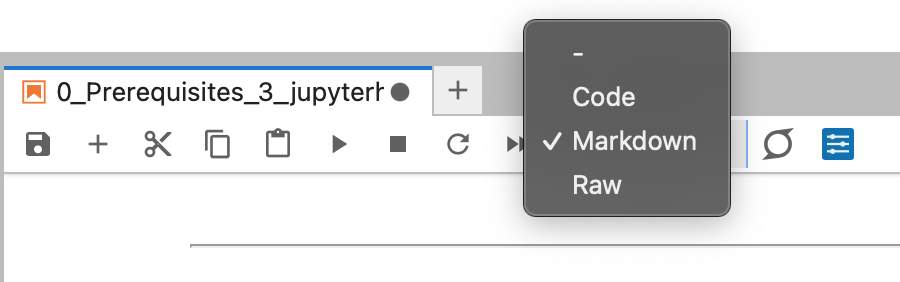
Figure: Cell types
How to run a cell?#
To run a cell, click on it and press Shift+Enter (Shift+Return on a Mac). The cell runs and the selection moves to the next cell; use Ctrl+Enter to run it in place.
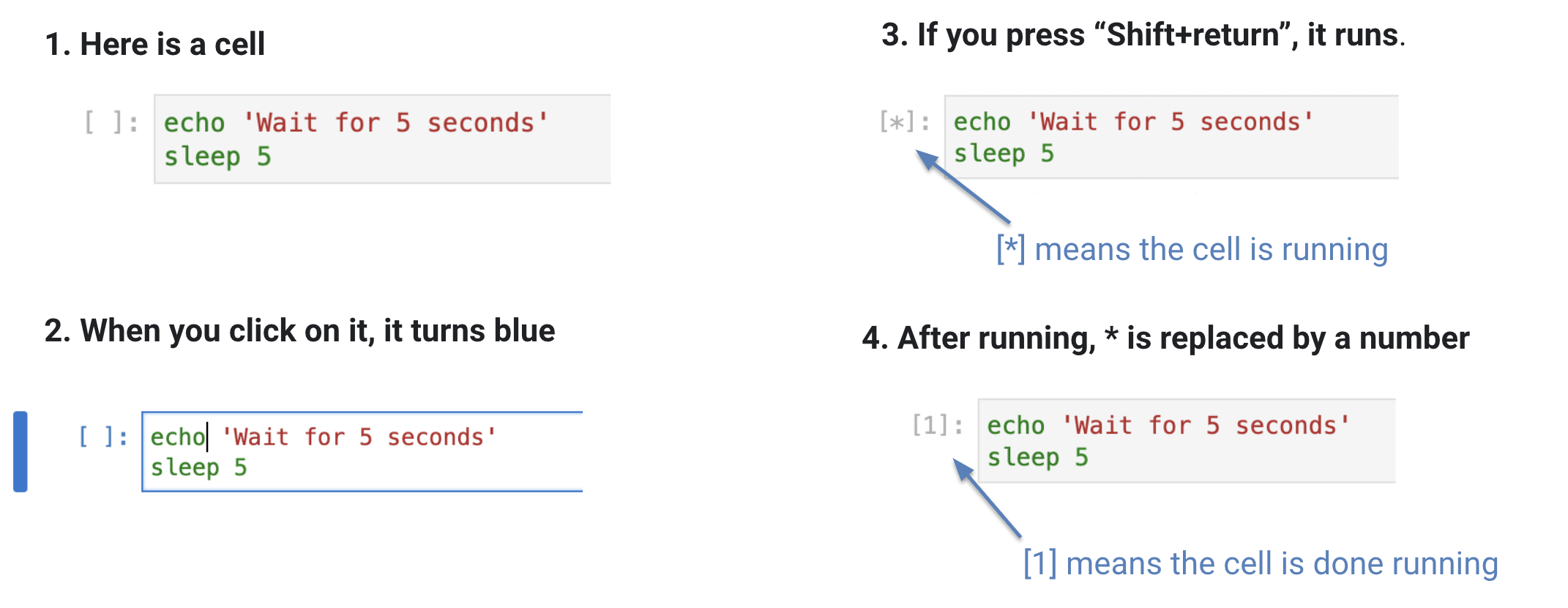
Figure: Running a cell
How to run a shell command within a cell?#
Prefix a line with
!to run any shell command in a subshell, right from a code cell. For example,!lslists the contents of the current directory:
# List the contents of the current directory

!ls
0.1_demo_unix.ipynb			 6_info_iCESM_iTRACE.ipynb
0.2_intro_jupyter.ipynb			 7_run_challenging_LGM.ipynb
0.3_demo_ncar_account_jupyterhub.ipynb	 _build
1_intro_to_CESM.ipynb			 _config.yml
2_demo_run_CESM_4steps.ipynb		 images
3_analyze_CESM_output.ipynb		 intro.md
4a_opt1_run_piControl_midHolocene.ipynb  LICENSE
4b_opt2_analyze_long_midHolocene.ipynb	 README.md
5_info_Data_Access.ipynb		 _toc.yml
Beyond shell escapes, IPython also provides magic commands:
%for a single line (a line magic) and%%for a whole cell (a cell magic). Some, like%ls, mirror shell commands but run inside the kernel:
%ls
0.1_demo_unix.ipynb                      6_info_iCESM_iTRACE.ipynb
0.2_intro_jupyter.ipynb                  7_run_challenging_LGM.ipynb
0.3_demo_ncar_account_jupyterhub.ipynb   _build/
1_intro_to_CESM.ipynb                    _config.yml
2_demo_run_CESM_4steps.ipynb             images/
3_analyze_CESM_output.ipynb              intro.md
4a_opt1_run_piControl_midHolocene.ipynb  LICENSE
4b_opt2_analyze_long_midHolocene.ipynb   README.md
5_info_Data_Access.ipynb                 _toc.yml
More learning resources (optional)#
Python & scientific libraries
Jupyter, Conda & GitHub
Go deeper