

4a. Option 1: Run a pair of piControl and midHolocene simulations#
Tutorials at the 2025 paleoCAMP | June 16–June 30, 2025
Jiang Zhu
jiangzhu@ucar.edu
Climate & Global Dynamics Laboratory
NSF National Center for Atmospheric Research
Learning Objectives:
Run simple CESM simulations
Gain hands-on skills on customizing the run length and namelists
Know the importance of validating your numerical experiments
Time to learn: 60 minutes
How to get started?
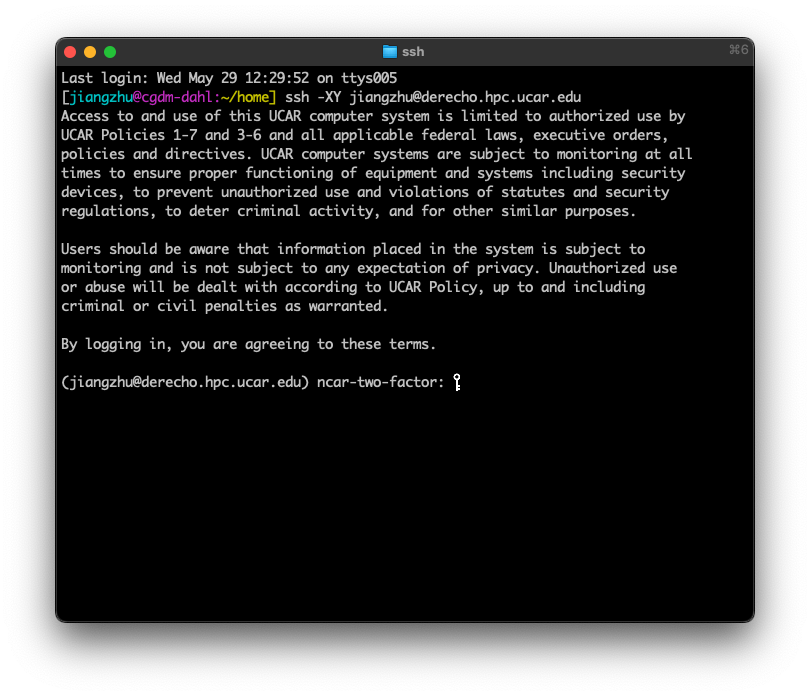
Use terminal from your system directly
ssh -XY YOUR_SUERNAME@derecho.hpc.ucar.edu
Type in your CIT password (the one you set up with CISL) and approve the DUO push
REMINDER: CESM directories
Source Code Directory (“Headquarter”):
/glade/work/jiangzhu/paleocamp/cesm2.1.5/Case Directory (“Production Control Room”): e.g.,
~/b.e21.B1850.f19_g17.piControl.001Run directory (“Factory”): e.g.,
/glade/derecho/scratch/jiangzhu/b.e21.B1850.f19_g17.piControl.001/runArchive directory (“Storage”):
/glade/derecho/scratch/jiangzhu/archive/b.e21.B1850.f19_g17.piControl.001/
Task 1: run a fully coupled preindustrial simulation for one year#
Hints:#
What are the four steps?
What is the compset for fully coupled preindustrial?
Use resolution of
f19_g17for fast throughputFollowing the CESM naming conventions, use
b.e21.B1850.f19_g17.piControl.001as the case nameWhich XML variable should you change to tell the model to run for one year? (do this before
./case.submit)It may take ~16 minutes to finish the one-year simulation.
Click here for the solution
1. create a new case: go into the scripts directory in the CESM Code and run the create_newcase command
cd /glade/work/jiangzhu/paleocamp/cesm2.1.5/cime/scripts
./create_newcase --case ~/b.e21.B1850.f19_g17.piControl.001 --compset B1850 --res f19_g17 --project UAZN0042
2. case setup: go into the Case Directory and run case.setup
cd ~/b.e21.B1850.f19_g17.piControl.001
./case.setup
3. case build: stay in the Case Directory and run case.build (change the run length using xmlchange)
./xmlchange STOP_OPTION=nyears,STOP_N=1
./case.build
4. Build and submit
./case.submit
Further information#
Building the executable may take more than 10 minutes.
While you wait, open a second terminal and practice your Unix commands (such as
cd,ls, andgrep) by visiting your directories of “Production Control Room”, “Factory”, and “Headquarter”, and see what are there.After submitting the job, use
qstat -u YOUR_USERNAMEto check the status of your job.Once the model is running, select one of your favorite components and read the log file (in the Run Directory, “Factory”) and see what the model is doing.
Task 2: run a fully coupled mid-Holocene simulation with the orbital forcing for one year#
Hints:#
Use compset
B1850and edituser_nl_cplto set up the orbital configuration (no mid-Holocene compset available)Following the CESM naming conventions, use
b.e21.B1850.f19_g17.midHolocene.001as the case nameAccording to Table 1 of Otto-Bliesner et al., (2017), Eccentricity = 0.018682, Obliquity (degrees) = 24.105, Perihelion = 0.87 (for simplicity, we don’t consider the other forcings here, i.e., CO2)
In the CESM world, this means
orb_mode = “fixed_parameters”
orb_eccen = 0.018682
orb_obliq = 24.105
orb_mvelp = 0.87
Search
orb_here to learn more
Use Unix editor
vi/emacs/nanoto open, edit, and save (Usenanoif you are not familiar with the other two)nano user_nl_cpl
These namelist changes can be done after
case.buildbut beforecase.submit
Click here for the solution
1. create a new case: go into scripts directory in the CESM Code and run the create_newcase command
cd /glade/work/jiangzhu/paleocamp/cesm2.1.5/cime/scripts
./create_newcase --case ~/b.e21.B1850.f19_g17.midHolocene.001 --compset B1850 --res f19_g17  --project UAZN0042
2. case setup: go into the Case Directory and run case.setup
cd ~/b.e21.B1850.f19_g17.midHolocene.001
./case.setup
3. case build: stay in the Case Directory and run case.build
Add the following to user_nl_cpl
 orb_mode = "fixed_parameters"
 orb_eccen = 0.018682
 orb_obliq = 24.105
 orb_mvelp = 0.87
Change run length and build the case
./xmlchange STOP_OPTION=nyears,STOP_N=1
./case.build
4. Build and submit
./case.submit
Task 3: how to validate your simulation setup#
Hints:#
Going through the log files (in the RUN directory, aka “Factory”) is one way to see how the model is being run.
Examining
*_infiles (e.g.,CasesDocs/drv_inin the Case Directory) is another way to check the setup.
Click here for the solution
If you want to check the log file,
cpl.log.xxx, in the Run Directory (when model is still running) or in your Storage Directory (when the simulation and archiving have finished).
e.g.,
vi /glade/derecho/scratch/jiangzhu/archive/b.e21.B1850.f19_g17.midHolocene.001/logs/cpl.log.3950708.desched1.240330-011322.gz
type /orb_params to search, you should see the following
 (shr_orb_params) Calculate characteristics of the orbit:
 (shr_orb_params) Calculate orbit for year:     -4050
 (shr_orb_params) ------ Computed Orbital Parameters ------
 (shr_orb_params) Eccentricity      =   1.868182E-02
 (shr_orb_params) Obliquity (deg)   =   2.410538E+01
 (shr_orb_params) Obliquity (rad)   =   4.207183E-01
 (shr_orb_params) Long of perh(deg) =   8.696128E-01
 (shr_orb_params) Long of perh(rad) =   3.156770E+00
 (shr_orb_params) Long at v.e.(rad) =  -5.751115E-04
Try also grep shr_orb_params YOUR_cpl.log
If you want to check the
drv_infile
vi /glade/u/home/jiangzhu/b.e21.B1850.f19_g17.midHolocene.001/CaseDocs/drv_in
type /orb_ to search, you should see the following
   orb_eccen = 0.018682
   orb_mode = "fixed_parameters"
   orb_mvelp = 0.87
   orb_obliq = 24.105
Try also grep orb_ CaseDocs/drv_in in the Case Directory
Tip: Quick visualization of CESM output on Derecho#
Option 1: Use
ncvis(recommended)
cd /glade/derecho/scratch/jiangzhu/archive/b.e21.B1850.f19_g17.piControl.001/atm/hist
ncvis b.e21.B1850.f19_g17.piControl.001.cam.h0.0001-07.nc
If the system cannot find ncvis, you can use /glade/u/home/ullrich/ncvis/ncvis b.e21.B1850.f19_g17.piControl.001.cam.h0.0001-07.nc
Option 2: Use
ncview(lightweight alternativ)
module load ncview
cd /glade/derecho/scratch/jiangzhu/archive/b.e21.B1850.f19_g17.piControl.001/atm/hist
ncview b.e21.B1850.f19_g17.piControl.001.cam.h0.0001-07.nc
Summary#
Set up and run a CESM simulation in four steps
Customize the simulation with
xmlchangeand namelist modifications